The Many Different Ways to Monetize Your Blog~How to Make Money Blogging

The Many Different Ways to Monetize Your Blog~How to Make Money Blogging

So You want to make money blogging, right? Of course, you do. We all do – Everyone wants to make good money while adding value to our communities.
So you start a blog but then what? How do you make money? How do you even get to the point where you can make an income?
Making an income blogging – whether it’s a business or a hobby blog –is very possible. It’s not, However, a get rich quick thing, but if you play your cards right, you could make enough money to support you, your entire family and lot more. Read on to learn how to Monetize your Blog in many different ways.

This Post may contain affiliate links.

MONETIZE WITH CPM OR CPC ADS\

Placing ads on your blog is one way to make a bit of money. It’s the most common way but you need a good amount of traffic to earn anything substantial.

Tailwind Visual Marketing Suite

But still, You have to start somewhere and it does bring in a trickle of money usually pretty quickly and it’s fun to watch! There are 2 very popular types of ads:
CPM Ads: or COST PER 1,000 IMPRESSIONS, otherwise known as ads that give you a certain sum of money based on the number of individuals that view your ads. And
CPC Ads (Cost per click) otherwise referred to as PPC (Pay per click) are generally banners that people place in their sidebars or content. Each time these ads are clicked by readers, the owners are paid for that click.

Google Ad-sense is the most popular network for placing ads of these sorts, But it’s not the best..Publishers don’t typically make much with this company.
With Google Ad-sense you don’t need to be in direct contact with the advertisers; all you need to do is place the banner on your website and Google picks ads that are of importance to your content, and these ads are clicked on by your viewers.
There are millions of these programs available if you observe that Ad-sense doesn’t work well for you, such as Media.net, Info-links, and Chitika..  These are all great for beginners.
There are tons of bigger companies as well once you get more pages views. You will make much more at that point.
Ad Thrive is the Mack daddy of all Ad Networks if you really want to make money with Ads. You have to have at least 100,000 page views per month before they will accept you though but when they do your ad income will go from hundreds to thousands.

SELL PRIVATE ADS OR DO SPONSORED POSTS.

When it comes to Making money with ads, working with advertising networks is not your only alternative. If you have enough traffic advertisers will come to you directly and ask you to place their ads on your website. You can contact them yourself also. The huge difference from the aforementioned option is that there are no middlemen, which simply means you can set your personal ad rates.
Private ads can come in the form of links, buttons, or banners. You can even make cash just by writing sponsored posts where you give a review or write about an advertiser’s service or product. Writing an underwritten series or post is another option, which is where you can just write about any topic you have, but the advertisers pay for the “Brought to you by”; mentioned in the content.
The ways you make your income selling ads will vary. You might for instance charge a one-time fee for a particular link in a post, or You might charge your partners every month; If you are hosting banner ads.

Join ACOP!

Pro Tip:
To maximize your income, you can choose to also sell sponsorship space in your podcasts, videos, and newsletters.

Affiliate Income

Another awesome way of monetizing your blog is through affiliate marketing. This is how it works:
An advertiser has products he wants to sell. He agrees to give you commission from the sale if the buyer(s) are coming from your website.
He gives you a specific link that tracks your affiliate code. He then knows when exactly a buyer makes use of your link to make a purchase.
You include the affiliate link on your website. You can do this through banner ads or directly in the content. You earn a percentage of what the reader purchases if he or she clicks on your link and buys any product recommended by you.
You can make use of affiliate marketing through ads networks such as Amazon Associates or you can simply create private partnerships with businesses and advertisers with an affiliate program.
There are also companies like Share~A~Sale and Click Bank. They are great for beginners.
I do recommend you take a good online course in Affiliate Marketing if you really want to make money this way. It can be very lucrative but you need to be educated on the laws and techniques of Marketing products through a blog. I took Making Sense of Affiliate Marketing. It’s by Michelle over at Making Sense of Cents and she makes $100,000+ a month and a huge portion of that is affiliate sales. She is the absolute go-to expert in this field and the course is worth every cent. They have a two-month payment plan too and it’s very reasonably priced compared to other blogging courses. You can check it out here if you’re interested.

Different ways to make money blogging

Here are some great blogging posts:

  1. Different Ways Bloggers Make Money | Blogging Series Part 3
  2. Why you should Start A Blog and Quit your Job. The Blogging Blue Print that Really Works!
  3. Make Money At Every Stage Of Blogging, How To make income From the Start
  4. Start A Blog Today | The Complete Tutorial with Screen Shots Of Every Step From Start To Finish
  5. The Key To Having A Successful Blog | Blogging Series Part 1
  6. How To Make Your Blog Sticky So You Get The Most Page Views
  7. Drive Traffic To Your Blog | How To Create Interest Through Social Media And Google | Blogging Series Part 4
  8. Blogging And Email Marketing | What You Need To Know | Blogging Series Part 5

SELL DIGITAL PRODUCTS

Eventually, you will want to create your own products. Just about every blogger does and it’s your real path to financial freedom. I know it may sound like a daunting task at first but I promise, once you start blogging and you really get going, Ideas will just fall into your lap.
Don’t worry about it at first, just create epic content. But after the first year when you have built up your email list somewhat, you can begin considering your choices.
Some of the different products you could sell are~

Courses
eBooks
Apps, themes, or plugins
Online workshops

Just make sure that your products are great and that you do tons of research. Make a great, quality product that solves your reader’s problems and you will do great. Pay attention and really focus on your reader’s needs.
USE YOUR BLOG AS A CONTENT MARKETING TOOL FOR YOUR PHYSICAL BUSINESS
If you have some sort of physical location and you sell physical products it’s great to have a blog as well. The web is a powerful marketing tool that every business needs to be a part of. You can create fans and useful content that will bring customers to your business time and time again. All great businesses have a blog and online Marketing strategy.
This can double or triple the amount of income you make with physical products.

SELL MEMBERSHIPS

Another money making option is selling memberships to exclusive areas of your site. A career blog may charge $20 monthly for instance; for individuals to have access to their work board. A startup blog might give memberships for sale to their forums where individuals can get information that would not normally be found elsewhere.
I have to say that I am not a fan of this money making technique. Monthly subscriptions sites have their onset of issues and I am not interested in dealing with that, and forgive me for saying so if you have a membership site but I think they’re a bit tacky :/
But anyway, The main factor here is that your exclusive membership needs to be relatively valuable and something that cannot be found in other places on the web, obviously.

USE IT TO BUILD CREDIBILITY

Using Your blog to expand credibility can lead to several money-making opportunities. Let’s say for instance that you begin a blog in the financial industry. Individuals start reading your content and as a result, your blog gets very popular. Now, you are a recognized individual in the financial industry.
People may approach you because of your authority; to co-author, a book(s) on debt management or you could even charge to speak at a conference or to even run an employee finance training camp. The possibilities are really endless.
These are just a few ways to make money blogging but there are plenty of other opportunities out there.
If you’re interested in doing this You should absolutely go for it! It’s truly an awesome way to find your financial freedom.
Here’s an amazing tutorial with screenshots of every step if you want to have a look. You’ll be able to get set up in about half an hour.
Cheers to making money!
Pin This Post On Pinterest! 
Make money blogging (1)
Different Ways Bloggers Make Money  | Blogging Series Part 3

Different Ways Bloggers Make Money | Blogging Series Part 3

This post may contain affiliate links.

Many people wonder how the heck bloggers make money. If you tell someone you are a blogger it’s the first question you’ll get. Many just don’t get it. But there is really good money to made in this industry despite what others may think and you don’t have to have a Harvard degree to be super successful.

There are a lot of different ways you can make an income blogging online. Affiliate Marketing is my favorite {Learn More below}

Today we will discuss the traditional ways to do this and how you can too. Let’s get right to it. 

Here’s a List of different ways to make money Blogging:

  • Affiliate marketing
  • Blog sponsorships
  • Display advertising
  • Ebooks
  • Courses
  • Services


First, let’s go over Affiliate Marketing. An affiliate is a person or business who promotes a product or service offered by other businesses. If you get someone to sign up through your affiliate link, you are then rewarded by the company for promoting their product.

This is what is known as a conversion. A conversion is when a person completes a specific action designated by the affiliate program. It may be when someone enters their email address on a company’s website, when they make a purchase, fill out a form, or some other action through your affiliate link. It’s a great way to make money on your Blog.

Make sure you make all Affiliate links NOFOLLOW so you don’t get penalized by Google. You can do this by using the Pretty links plugin.

If you are serious about Affiliate Marketing and you really want to earn big bucks you are going to need some real education, not just all the crap you find on Google University.

Make Money Blogging, Three Bird Nest

I highly recommend the course Making Sense of Affiliate Marketing. It will teach you EVERYTHING about the subject and you need to be an expert to Use Affiliate Marketing to its full potential. I took the course myself and love it.

The course was created by Michelle over at Making Sense of Cents and she makes over $100,000 a month with affiliate marketing and blogging. Yes, you read right, no typo. You can check out this important course here. 


OK on to Advertising..Display advertising is when you place an advertisement on your blog in the sidebar, below a blog post, below your header image, or in some other location on your blog. Then, for every so many views that advertisement sees, you will earn a certain amount of money. If you have a lot of page views, this will be an easy way to add extra income. Some bloggers make up to $10,000 a month just on adds!  But this depends on your traffic so you need to add a lot of content and get it in front of eyes. 

Ebooks are a great way to make money as well. You can create them fairly quickly and sell them on your blog, Amazon and Barnes and Nobles. I highly recommend creating your own products and this is a good choice.


Courses are another great way to boost your income dramatically. You can create courses to sell through teachable. Many online Entrepreneurs are really into course making right now. They share their knowledge and make huge profits. 

One other thing you can do is offer services of some kind. Whatever you are good at that is related to your niche is a possible way to boost your income. 

So these are a few of the main ways you can Monetize your Blog. Pick a few or heck, do them all! As long as you create great content and Epic products, You’re Golden!

Are you ready to take the plunge now and go ahead and start your blog? Well, I have a badass tutorial here with screenshots of every single step, from Setting up hosting to Getting your WordPress site all set up and ready to go. You can find that post right here. It’s the only guide you’ll ever need. 

If you found this post helpful I would love it if you would share it with your friends. I worked really hard on it to provide my readers with a solid education on how to set up a website. You can share with the buttons to the left or the ones below.  Thank you so much.

Be sure to take a look at the other posts in this series. There’s a lot of good information in there!


The Key To Being  A Successful Blogger { Part 1 }

Deciding on a Niche for your blog { Part 2 }

How To Drive Traffic to Your Blog { Part  4 }

Why Email Marketing is so important to Bloggers { Part 5 }

Blog Tutorial With Screenshots every step of the way { Must Read! }

I would love it if you would share this post! 

Pin It For Later!

Different ways bloggers make money


Have questions? Leave a comment below!

Start A Blog Today | The Complete Tutorial with Screen Shots Of Every Step From Start To Finish

Start A Blog Today | The Complete Tutorial with Screen Shots Of Every Step From Start To Finish

This post may contain affiliate links that help keep our blog up and running. 

Update: BlueHost is now running a special offer For you! You can now set up your blog for just $3.95 per month For 12 months! That’s only $47.40 for the WHOLE YEAR! That Also include your FREE Domain name! Hurry before their prices go up! Sign Up Here. 

Why would you want to start a WordPress Blog or home business? Because it’s life Changing. You can escape your 9 to 5 and start chasing your own dreams. You can work towards something for you and not grind yourself to the bone for someone else’s dreams.

With hard work and determination, you can be making thousands of dollars a month within a year that will often far surpass what you were making before. You can wake up each day, have a cup of tea, and design your own day how you see fit. You are in complete control and it’s very liberating!

With a little planning and Motivation, you will unleash some serious ambition.

{ Hold Up Real Quick. If you’re interested in learning more about blogging I have a free course that has helped others set up great blogs with a solid framework. It’s free, no strings attached. Sign up Below! }

Once you get started you’ll realize it’s one of the best things you have EVER done. This happened to me and I’m just your average mama..~ True Story!

Start a Blog Now Tutorial

Pin This For Later On Pinterest So You Can Come Back to it!

Today I want to walk you through the steps it will take to set up your own blog or website for your business, and get you on your way to the life you want! Stop putting it off and do something great!

You don’t have to spend thousands of dollars to have someone set up a website for you either.  It’s actually very cheap and simple. You can do it all yourself in 15 or 20 minutes. It’s crazy easy!

The very first thing you need to do is sign up for online hosting and get your domain. You can do that with BlueHost all at once and they’re the leaders in the industry.

Why Choose BlueHost??

Why Choose Them? Because BlueHost is only the best there is. It’s also Dirt cheap yet they offer top of the line service. Buying hosting with one of the other popular companies like Host Gator will get you poor service, a website that is down often, and Blocked the second you come even close to running out of space. That’s a big mistake, Don’t make it. Then you have to worry about transferring your website and that can cause its own problems. It’s not an easy process.

You should start off smart and get it right the first time.

BlueHost is so cheap, right now you can get Hosting for $3.95 a month! So Do it now before prices go up. You can go ahead and sign up here if you want to do it now, and then come back to this tutorial and finish your set up.

BlueHost also offers a free domain, it’s incredibly easy to use, and there’s a money-back guarantee and you can reach them 24/7 for tech support and customer service. Like I said, the best of the best.

A Quick Note: Never host your site on WordPress.com {Wordpress.org is the choice of all professionals}, or sites like Blogger. These companies limit how you can make money on site { No ADs aloud! }, they have limited space, they often look terrible and you don’t own your domain. It’s unprofessional and worst of all you can be shut down at any moment!

Moving on….

The following will be a step by step guide to setting up the blog or Biz you have always wanted and how to actually begin making money from it. Trust me if I can do it, anyone can! This guide has every single step. You won’t be left wondering what to do next.

Let’s Start A Blog Or Business Site!

In this tutorial, I will give you step by step instructions with screenshots on How to Start A Blog as painlessly as possible.

{If you think you won’t be able to finish this post today make sure you pin it or save it so you can come back to it and get the job done. You can save it by going to the bottom of the post and pinning it to one of your Pinterest Boards, There’s a big, beautiful pin made especially for this post. Or save it in one of your social media profiles with the buttons to the left}

There are three easy steps to take:

    1. Set up Hosting and Picking your Domain {$3.95 per month with a FREE Domain}
    2. Install WordPress {FREE}
    3. Make it Pretty with the right theme {$0 To $100}


Let’s Begin!

This is what their front page looks like when you go over to the site~

You can get there by Clicking Right here.

Blue Host Blog Set up Tutorial

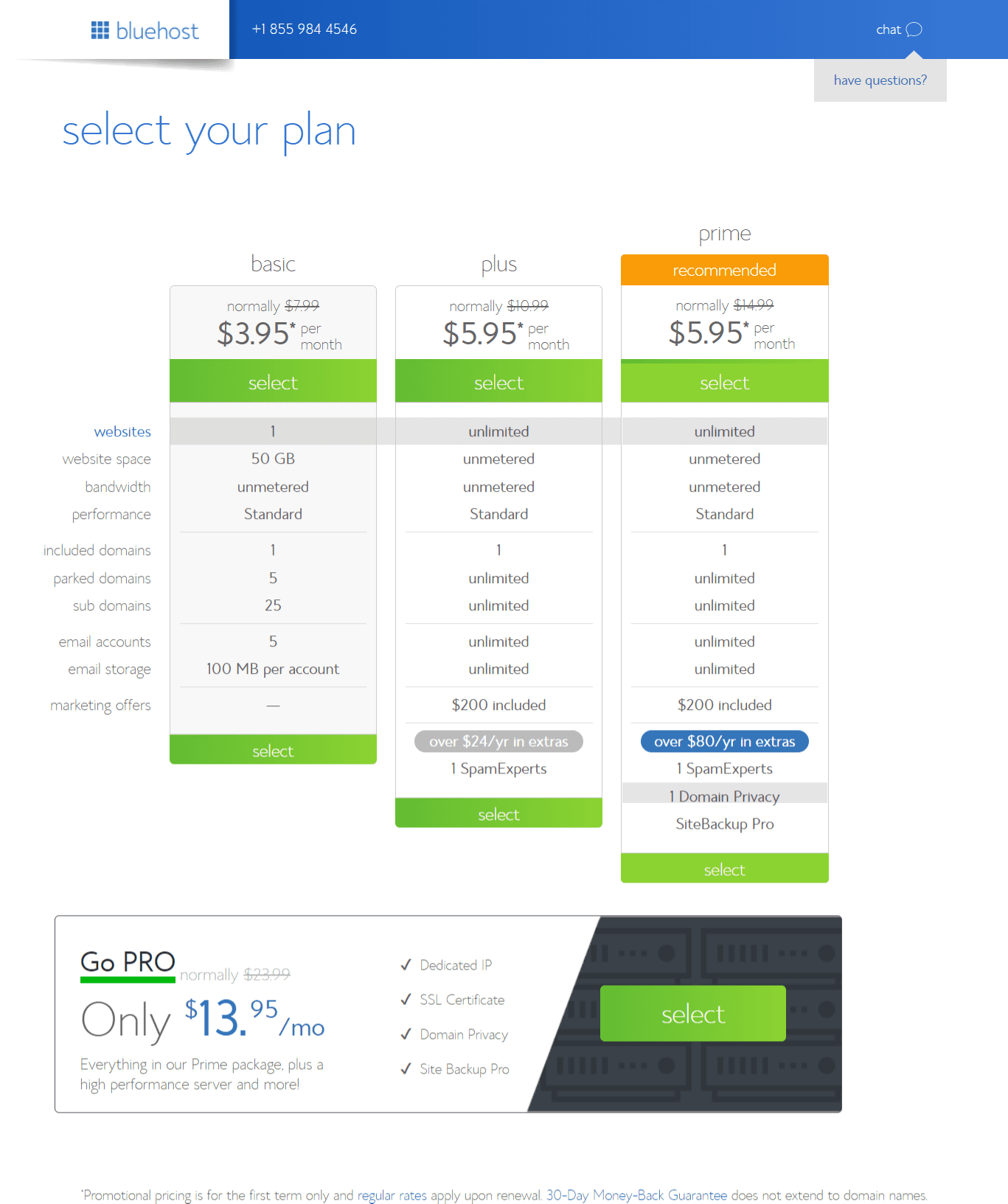
Once you decide to go for it you’ll be taken to the next page where you will be able to pick your plan. Here’s what your next step will look like~

Blue Host Blogging Tutorial Step by Step

If you’re on a budget then go ahead and pick the cheapest plan for now because that’s all you’ll need at first. You can always upgrade later if you want. This package information is for space requirements and how many websites you want to add. You will get to pick your time frame package coming up in just a few minutes.

Get Your FREE Domain

You can get your free domain name right now by clicking here. Or You can check availability for the one you want in the box below:

This is what the Domain Name page looks like on BlueHost and it will be the next page you see after picking your package from the screenshot above.

Blue host blog Tutorial step by step

If you already have a domain name then you would just add that in the second box on the page from the screenshot above. It’s still all very simple to do.

Enter the domain you have chosen and now you can move on to creating your account~

Blue host blogging Tutorial


On this page, you can decide how long you want to purchase hosting. You can choose 12, 24, or 36 months. The longer the period of time you choose, the more money you’ll save.

Add your credit card info and you have got yourself a website. Congratulations!!

Now you will be guided to create your password. Make sure you create a very secure one and write it down right away in a safe place.

Now let’s get ready to install WordPress!!

Installing the Infamous WordPress

By Choosing BlueHost you have made setting up WordPress so much easier!

Bluehost offers “one-click installation” for WordPress beginners so that you can have your site ready to go in seconds.

After creating your password you will be able to log in to your cPanel. That is the back end of your hosting account. It’s where you can create your website, create emails, view space limitations and change passwords.

I recommend hopping over to YOUTUBE after you’ve set up everything and watch a quick 10-minute cPanel video so you know where everything is at on their platform. There are thousands of videos to choose from on the subject.

So Moving on.. Once you’re in cPanel you’ll need To Head to ” My Sites ” and click Create Site as shown below in the screenshot.

Blue Host WordPress Tutorial

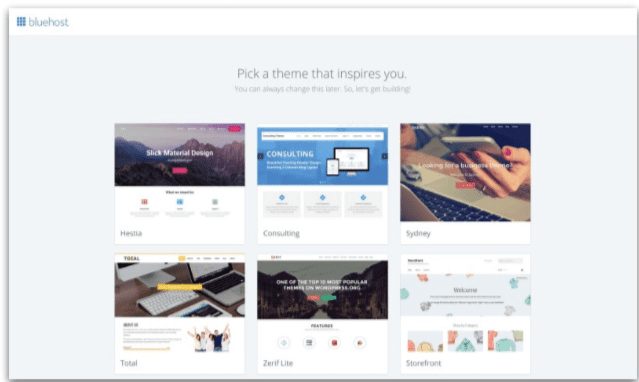
After that, they’ll ask you which theme you want to pick. You can pick a free one if you want to start but they are limited in design and the code is not always very good which has been known to cause problems.

All Professionals have a premium theme and almost everyone uses DIVI by Elegant Themes. It’s by far the best and most professional and versatile theme designed especially for WordPress. I could sing their praises to the moon and back, I adore them so much. I build all my sites with them and no matter what you pick now you’ll eventually make your way over to DIVI. Everyone Does. You cannot make your site look better with any other theme. Plus with the Divi theme membership, you also get the premium theme EXTRA And the Premium plugins Bloom {Used for email opt ins} and Monarch {a Social Media plugin that adds links to your posts and pages for sharing}. You can check them out right here. 

Anyway, You can pick one of the free ones for the moment then Go over to Elegant Themes and Install it later or you can just skip picking a theme right now. The choice is yours.

The page will look like the one below.

Blue Host Blogging Set up Tutorial

Next, you’ll just need to log in to WordPress. It’s as simple as that. You will see the login area to the left of the page below:

Bluehost WordPress Tutorial Step by Step

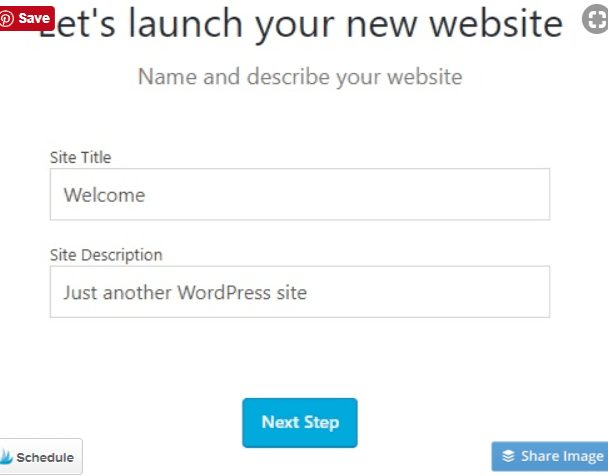
This is what You’ll see next:


bluehost wordpress tutorial

After this step you’ll see this:

Bluehost WordPress Tutorial

Then you’ll be asked a series of questions about your site including:

Are you going to update your site regularly with news or blog posts?

What should visitors see when they come to your site? Updated news/ posts or a static homepage?

Would you like to create a starter contact page?

You’ll be asked if you want to connect Jetpack. If you don’t know what that is yet you can click ” Not Now” {Personally I don’t use Jetpack because it gave me problems in the past, So I just suggest skipping it}

Then You’ll be asked to add your biz address if you have one:

Bluehost Start A blog tutorial WordPress

Now you’ll be close to finishing up and you’ll see this on your screen:

Bluehost-WordPress-customize-your-site


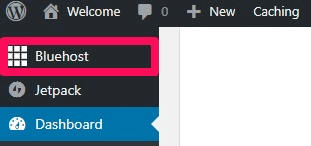
At this point, you can go back to your Bluehost dashboard by clicking “Bluehost” on the left-hand side of the control panel.

Bluehost-WordPress-dashboard-control-panel

This is what you’ll see next and if you’re ready to launch your site then do it!

Bluehost-WordPress-launch-site


Now your site will be live. Congrats.

Next, let’s take a look at the WordPress dashboard so you will know what to expect.

This is what you’ll see after signing to WordPress:

WordPress Blue Host tutorial


On the left, you’ll see a long menu. That’s where you go to add pages or create posts. Once you get in you should click on each menu item so you can get a feel for everything and learn your way around. Maybe go to YOUTUBE and have a look at another tutorial so you can really get to know the platform.

The first thing I like to do is go to settings and make sure everything is set the way I like. There will be a drop-down menu and you can go to each link for set up.

Start with General Settings. Be sure to fill everything out.

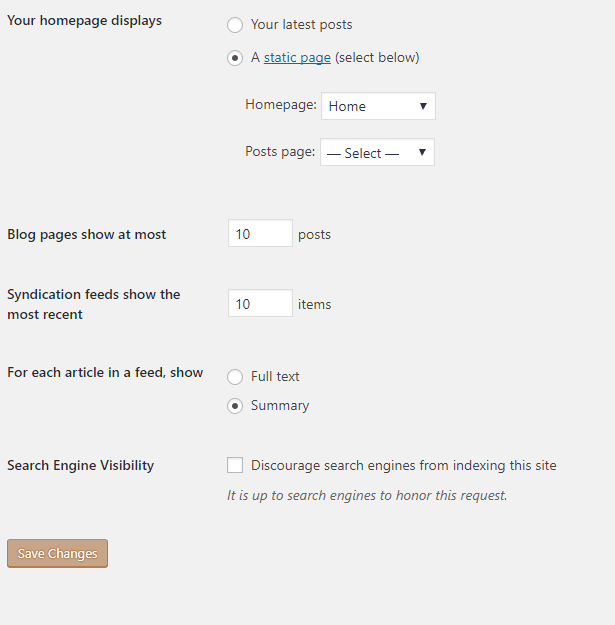
Leave the writing settings as they are. Then move on to the reading settings. If you want your homepage to be your blog posts then click on your latest posts. But if you want a front page you’ll click on ” Static Front Page “.

Blue Host Blog Tutorial

For each article in a feed, show Summary.

Lastly, make sure you do not check the box that says “Discourage search engines from indexing this site “

If you do Google will not be able to see your site and that’s no good at all.

Move on to the discussion and media links and pick your preferred settings. Then on to Permalinks.

The Permalink section is very important to your SEO and the appearance of your site. If you don’t have the right link structure your site will seem very unprofessional. The section looks like this:

WordPress set up step by step


Make sure you have the post name chosen. This will create links with, you guessed it, the name of your posts. That is by far the best choice.

Appearance Of Your Site

Now you can move on to Appearance. You will find that ” Themes ” is the first link in the drop-down menu. Go there next.

You can pick a free theme for now or you can go ahead and get set up the right way and pick Divi. 

Here’s what your theme page will look like:

bluehost wordpress demo

If you pick a free theme just preview it then click on install.

Quick note: Your site will not look like the demo of the theme because you have no content yet. It may look pretty blank and maybe a little intimidating but don’t worry, it will all shape up.

If you decide to go with Divi you would download the theme from the Elegant Themes website and then you would click on the upload theme button on the screenshot above in the top left corner.

That would take you to a page that gives you the option to upload your file. Search and upload it and then click install.

It will then automatically install and the deed is done. To learn more about Divi once you have it installed, again I will suggest YOUTUBE. They have TONS of amazing videos on Divi and you’ll never be left wondering how to accomplish your task.

The next step will be to add Plug-Ins to your site.

Plug-Ins

So what is a Plugin anyway??

“Plugins” are extensions that are built to increase the capabilities of  WordPress’, adding features and functions to your site that doesn’t come built-in.

You can use plugins for SEO, Google Analytics, Cacheing your site, Optimization of all kinds, Social Media and so much more.

To get to this section of your site just go to the left-hand menu and click on Plugins. This will bring you to the page where you can install what you need. { Screenshot Below }

Here’s what the plugin area looks like:


Word Press Blue Host tutorial

You’ll likely find that WordPress Comes with a few plugins when Installed. I always delete these and add my own. Here’s a list of plugins I recommend for your site:

  1. Yoast SEO Plugin~ This is the very best SEO plugin made and used by almost everyone
  2. WordFence~ This one will protect your site from spam and malware
  3. Fastest Cache~ The Best Cache plugin to keep your site quick and clean
  4. BJ Lazy Load~ This one speeds up your site by loading the large pictures as the readers move down the page.
  5. Broken Link Checker~ This will keep all your links healthy and that’s really important to Google
  6. Pretty Links~ If you end up with any affiliate links on your site they need to be nofollow. This is also completely necessary and important to Google.
  7. WP Smush~ This will help keep your pictures light and your site quick.. Make sure you have it.

There are thousands of other plugins you can consider to create more functionality to WordPress but keep in mind, Plugins can load down your site and slow it down, So keep it as minimal as possible.

But the ones above, in my opinion, are a must.

If you buy a premium Plugin or find one somewhere other then the backend of your WordPress, You can simply upload it into your system. Just click on the upload button at the top left and then upload your file as we talked about when discussing theme installation.

Now that you’ve chosen your plugins and set those up we can move on to editing your sidebar.

Sidebar and Widgets

The sidebar is the section of a website usually to the left with the information you can click on to move around on the site. There’s usually a search bar, Latest Posts, Ads, Categories and things like that.

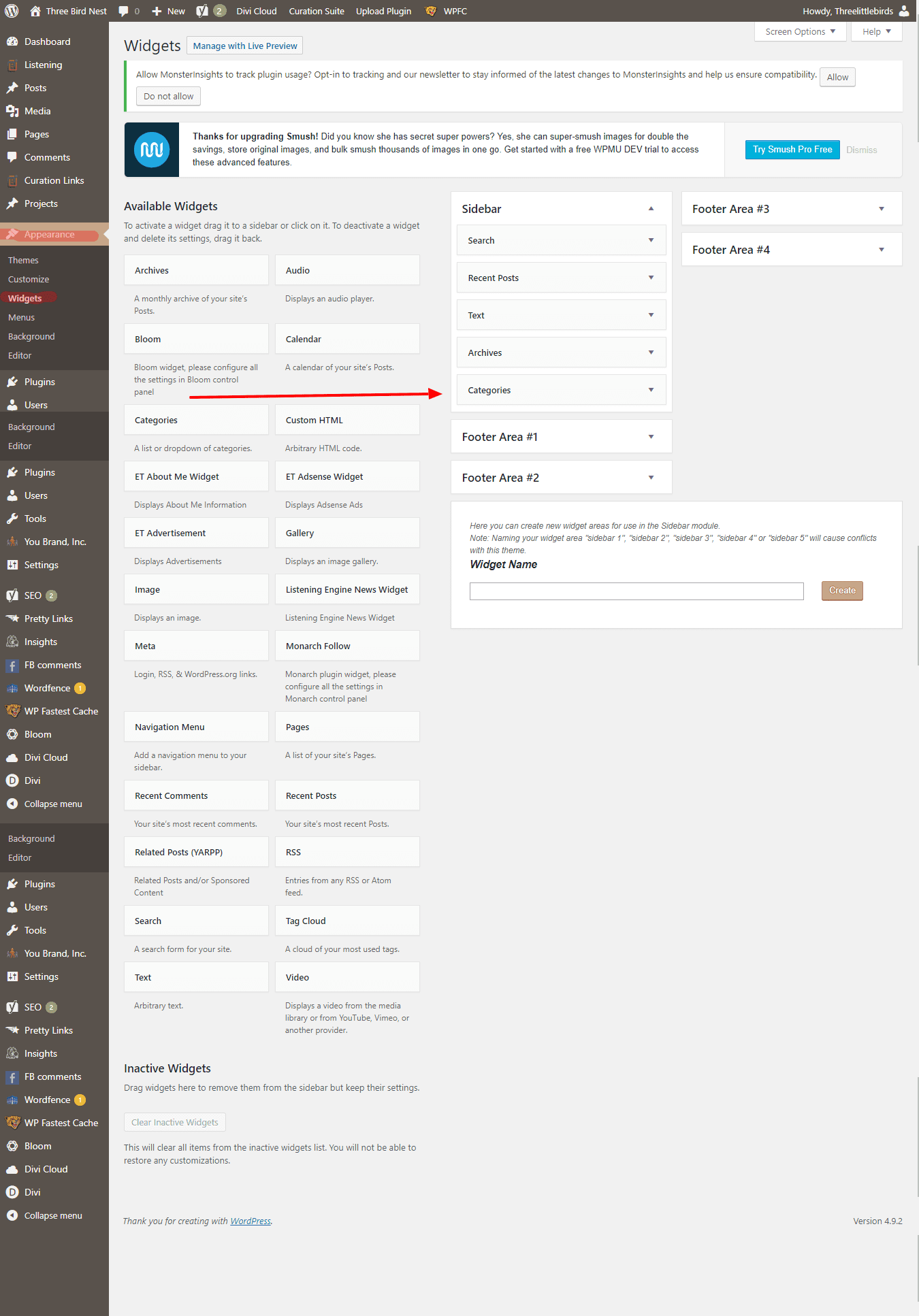
To edit this section you will go to ” Appearance ” on the left-hand menu and when the drop-down menu appears you will pick ” Widgets “. This will take you to a page that looks like this:

Start A Blog Bluehost Tutorial step by step with screenshots


This area of the site is a drag and drop section.

First, have a look at the right side. That’s what is already in your widget area.

If you want to get rid of sidebar items you do not need like “Categories”, “Meta” and “Archives”, which are usually pointless, click on them. It will open up and you’ll have the option to delete the widget from that area.

Now pick the widgets you would like shown on your site and simply drag them from the left to the area on the right where you would like them placed. They will then open up and you can fill out any needed information.

With the Divi theme, you can create custom widget areas that you only show on certain pages. This is an amazing feature and it keeps your pages and posts on point and relevant.

There’s also an “HTML box” – a text box where you can use HTML code. This is how you can put ads in your sidebar.

Drag over a text box, open it up, and then click on the text tab at the top right so the system knows you’re adding code. Add the code then click back to visual and you’ll see the ad.

Here’s a screenshot of the text widget:

WordPress Tutorials

It’s all pretty easy once you get the hang of it. If it seems overwhelming now, Don’t worry, Understanding WordPress will come to you fast.

The last thing I want to go over is how to add content and create pages.

Adding Content

So now it’s time to add the content to your site. You can begin by taking a look at your left Menu once again.

There’s a section for pages and a section for posts. Your pages should be your main information. For instance, your home page, about page, any legal pages, and contact forms will be permanent pages.

All blog entries or articles will be under posts.

To create a new page or post click on the link and you’ll be taken to a page that looks like this:

Bluehost Tutorial

You need to simply add your content and photos. After you’re done make sure to proofread TWICE and add tags, category, and your YOAST SEO data at the bottom.

A quick tip: To add photos to your posts click on “add media’ at the top of the toolbar in WordPress. You can see it in the screenshot above. That’s where you’ll be able to upload your photos into your WordPress Library.

Then add your feature image, preview, and then hit publish.

Wash, rinse, and repeat over and over to populate your blog or website with content that will bring in more and more readers over time.

That’s pretty much it. You should now know how to create your website and move around WordPress with confidence.

You will learn more as you go and it will get easier and easier. Being a success will depend on your motivation and consistency. If you’re ambitious, there’s nothing stopping you! You can do this and I’m rooting for you!

Would you like to learn even more about the blogging process? I have a series that goes into the mechanics of running a successful, money-making blog and I suggest you read it. The links are below:

The Key To Being  A Successful Blogger { Part 1 }

Deciding on a Niche for your blog { Part 2 }

Different Ways To Make Money as Blogger { Part 3 ) 

How To Drive Traffic To Your Blog { Part 4 }

Blogging And Email Marketing { Part 5 }

Read below for some important pro tips…

Pro Notes:

    1. Readers like to see plenty of beautiful photos when reading posts. You can find free stock photos all over the web. Never take photos from Google or other sites. You can get sued and it does happen! You can also buy amazing stock photography just for blogging at Oh Tilly’s and Ivory mix. I highly recommend both. You’ll fall in love when you see what they have to offer.
    2. Break your content up into small sections. Online readers hate big long paragraphs and they will hit the back button the second they see that writing style. It shouldn’t look like a textbook.
    3. Use Grammarly. It’s a browser extension that will double-check your grammar and spelling and all online writers need it. It’s a must.
    4. If you’re a blogger make sure you use Pinterest to get your posts seen. Learn how to make an amazing Pin with Canva and build up a nice following on the platform. You should do a little research on Pinterest because it can bring in massive traffic early on. You can and should use social media schedulers to get your posts out there as much as possible. Board Booster is a good choice as well as Tailwinds. Click the banner below to have a look at Tailwinds. They’re the best in this business. You can check out BoardBooster Here.

Tailwind Visual Marketing Suite

5. Make sure you get Google Analytics for your site, submit your site to Google AND Yahoo, and please know that you won’t get any traffic from Google for a while. It can take anywhere from 3 months to a year depending on how much and how often you write. This is normal.

6. You should start an Email list RIGHT AWAY. They say the money is in the list and it’s true. You need to understand and educate yourself about email marketing for a blog or business right away because it’s a big part of the business and how you’ll make money. You’ll need a good email platform to use and I will suggest ConvertKit. It’s an email platform made just for bloggers and it’s the best.

I’m going to wrap this post up here. If you found this post helpful I would love it if you would share it with your friends. I worked really hard on it to provide my readers with a solid education on how to set up a website. You can share with the buttons to the left or the ones below.  Thank you so much.

Pin it For Later!

How to start a blog tutorial

Got a question? Post it below!

Blogging Resources:

Bluehost

DIVI By Elegant Themes

Tailwinds For Pinterest And Instagram

BoardBooster For Pinterest

ConvertKit 

The Key To Having A Successful Blog | Blogging Series Part 1

The Key To Having A Successful Blog | Blogging Series Part 1

There are so many reasons to start blogging. I started Blogging because I love the web and I needed a creative outlet to express myself. I also needed to supplement our income. I am a stay at home mom with three babes so every bit helps.

Below are some great reasons you may want to think about starting a blog too.

1. Because it’s super duper Fun!

Blogging is really fun. Like I mentioned before, it’s a great creative outlet and hobby. You get to help your readers and learn as you go. It’s one of the best, most fulfilling kinds of businesses to have and there’s endless potential in any subject you pick.

2. To help others

There is someone out there that has a question and you have the answer. You can share your knowledge of any given subject and truly help others no matter what your niche. For me, I really enjoy blogging about being a new mom, staying at home and being an entrepreneur.

What a successful blog looks like, Three Bird Nest

3. To Build a Business

You can build a Business with A Blog and Make a very substantial income as you know. That is likely why you’re reading this to begin with. A Blog can enhance a business you already have or it can be a business on its own.

Now, let’s discuss what a successful Blog looks like. There are several characteristics that all really profitable blogs have. The characteristics are Niche, Design, Their own products, and Authority.

Janie and Jack Sale on Now

Professionals Don’t just Blog about their day or whatever they feel like in that moment. There is a place for blogs like that, but they aren’t money-making machines. Blogs that make money have a very narrowed focus and specific purpose. They know their niche and they stay clear on their path.

The design of your blog matters too. I know you’re excited about blogging and you want to make it really pretty with lots of colors and fonts, but trust me if you want to make money this is not the way to go. Professional Blogs are minimalist, streamlined to make the content shine and they have excellent navigation. Don’t feel bad if you’ve made this mistake, I did this too! It was ridiculous.

If there’s tons of clutter and too many options in the sidebar, the visitor get’s overwhelmed. You want them to have a couple of obvious choices and you want to put those choices up front and center. Your main goal should be gathering up emails, of course. Most people won’t buy any of your products or your affiliate products right away. You need to court them a bit, so to speak. Create real fans who believe in your authority on the subject, then they will trust you enough to buy. This should be your MAIN priority. That and creating great content.

The next thing that creates a blog that makes tons of dough is CREATING YOUR OWN PRODUCTS. Sound’s like a daunting task doesn’t it? Well once you get your ball rolling, that idea won’t seem so scary. At all. Once you’re more experienced, ideas for this kinda stuff will just fall into your lap, and this is your real path to Wealth. I have not created my own products yet but I am working on a site where I offer web Design services because that’s what I am good at. Services works too.

But creating your own products [ or services ] is the key to modern Blogging success, My friends. It’s all shifting in that direction. As more blogs pop up and Affiliate Marketing becomes over-saturated, it becomes harder and harder to make money in the traditional ways. Many still make money like this, and you should still definitely peruse traditional money paths like Affiliate programs and Sponsored Posts, but I would advise any new Blogger to plan on making their own sort of products in the future. Begin planning for this as soon as possible.

The last characteristic of a Successful Blog is having authority in your niche. The path to authority is simple. Create seriously Bad ass, epic content, Give away your knowledge, Like in a free course and create amazing products that Really help your audience.
Tailwind Visual Marketing Suite

Those are the characteristics of any really great blog. So think about it closely and build your blog’s Framework around that.

I know you must be thinking about starting a blog and I hope this gives you something to consider. There’s never been a better time than right now. It takes time and effort but it’s so worth it. Many Bloggers say that blogging is one of the best things that’s ever happened to them and I couldn’t agree more. What a liberating experience it is to take control of your life, help others and take hold of your financial future giving it infinite potential.

Would you like to learn even more about the blogging process? Read the rest of the series below.

Deciding on a Niche for your blog { Part 2 }

Different Ways To Make Money as Blogger { Part 3 ) 

How To Drive Traffic To Your Blog { Part 4 }

Blogging And Email Marketing { Part 5 }

Blog Tutorial With Screenshots every step of the way

Did you find this information useful?  If you did I would love it if you would share it with your friends. I work hard on my posts to create quality education for my readers.

You can share with the buttons below or to the left of the page. Thanks so much!!

Have a question? Comment below.

Pinit For Later!

Successful Blogging Series Part 1

Why you should Start A Blog and Quit your Job. The Blogging Blue Print that Really Works!

Why you should Start A Blog and Quit your Job. The Blogging Blue Print that Really Works!

Why you should Start A Blog and Quit your Job. The Blogging Blue Print that Really Works!

Do you know that many people have become very wealthy Blogging? It’s very possible and some do it in just a few years. Stay at moms and young women just like you and me… That blows my mind.

While I’ll admit reaching for millions is a bit over ambitious, you can make really good money and create total financial freedom. Amazingly it’s not nearly hard as you would think. You need determination, ambition and consistency. Oh and you need to enjoy writing as well!

So do you want to know how to be a successful blogger and become wealthy doing it? There’s a Blue Print you need to follow and it works every time.

Let’s talk about a few things before we get into the success blueprint. First, you need to know that you DO NOT become a successful blogger by screwing people over. Those that are dishonest rarely make any real money and when they do it’s usually short-lived.

You become Successful by creating value in the world, and by solving problems.

Another thing you need to know is that Ads and affiliate sales are NOT the most profitable ways to make money. If you have any hope of making real money blogging you need to think about other ways of monetizing. Sure you can use those ads and affiliate links but You need a very high volume of page views, like about 100,000 per month to generate enough income to pay your bills.

Finances Three Bird nest

But don’t let that discourage you….There are other better ways to make money blogging. Now let’s get into the perfect blogging formula...

Assuming you have a niche narrowed down and some great blogging ideas here’s the formula you will need to follow~

  1. You need to understand that your blog is your business and you need to treat it as such. You need to put in just as much effort as you would with a full-time job, Maybe more. There’s no magic bullet to anything. You have to work your little ass off.
  2. Create a product when you’re ready. This can be a course, Ebook, Software, Membership site, or whatever.
  3. Grow your email list because it’s one of your most important assets.
  4. “Sell” your product. I put sell in quotes because you could sell your product for money or you could sell it for an email address. But understand that the concepts are the same. You create products that solve problems and charge for them. That email address is more valuable in the long run than a single sale for money.
  5. Pay for ads to drive traffic to your landing pages where you encourage people to sign up for your email list in exchange for your product.
  6. Understand that marketing is a multi-step process. Don’t bother asking cold traffic to buy something for money. Marketing is a seduction. Keep drawing them closer to you with free or small offerings. Your real goal is not to sell products, it’s to build a relationship with them based on trust. Once they know, like and trust you, they are MUCH more likely to buy from you.
  7. Then when you have gained a lot of trust you can sell your real, valuable courses, or products to your list.
  8. Lastly, keep growing your list and adding value and keep selling those high-value products.

This is the blueprint bloggers use to become millionaires and it absolutely works. It’s pretty hard work but it’s well worth it and the financial rewards are really great. It usually takes 3 to 8 years of hard work to get to the big bucks. But you can start doing really well within a year.

If you're not ready to create your own products right away you can promote other’s products and do really well, but if you want to maximize your profits you will eventually need to create your own.

That sounds like a big job huh? Well once you really dive into blogging,  ideas will start bubbling up and you will be working on your own stuff in no time.

So do you think you can do it? Do you have what it takes?

If so here’s a link to the Blog set up Tutorial with screenshots.

It would really Make my day if you would share this post with your friends. It means so much! You can share with the buttons to the left of the page or below. Thanks!

Pin it for Later!

why you should quit your job and start a blog! Three Bird Nest